BACnet HMI HMI5 Getting Started Guide - User Manual
Build HTML5, CSS3, and JavaScript interfaces for visualizing and controlling BACnet systems on iPhone, iPad, and Android with HMI5.
Overview
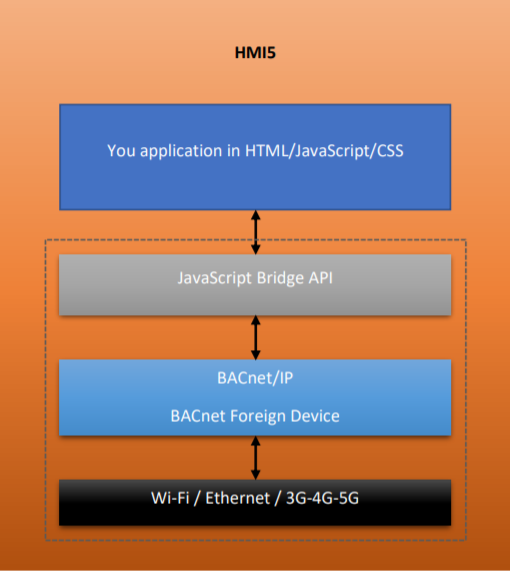
HMI5 lets you use standard web technologies such as HTML5, CSS3, and JavaScript to develop your own BACnet interface for iPhone, iPad, and Android without the complexity of native platform development.
The application relies on a simple configuration file named config.json. The file provides information about the application and specifies parameters that affect how it works, including the BACnet network configuration.
Your application is implemented as a web page that can reference the CSS, JavaScript, images, media, and other resources required by the project. HMI5 provides JavaScript APIs for accessing devices on a BACnet network.
iPhone and iPad
For iPhone and iPad, include the hmi5ios.js file in your project and reference it from the web application.
Android
Android applications use the same web application approach. HMI5 exposes the BACnet and platform interfaces through the JavaScript environment provided to the page.
Configuration file
The configuration file must be named config.json.
iPhone and iPad
Place the configuration file in the BACMOVEVIEW folder available through HMI5 file sharing. Apple provides instructions for accessing application file sharing on Windows or macOS Mojave and earlier and macOS Catalina and later.
Android
Place the file in the BACMOVEVIEW folder inside the HMI5 application directory. A typical path is:
Android/data/com.bacmove.hmi5/files/BACMOVEVIEW/config.jsonThe following example shows the main configuration structure. The foreignDevice, requestCPULock, and requestWiFiLock properties are optional; the other fields should be present.
{
  "config": {
    "BACnet": {
      "deviceID": 4000001,
      "deviceName": "HMI5",
      "port": 47808,
      "foreignDevice": {
        "BBMDIP": "8.8.8.8",
        "BBMDPort": 47808,
        "BBMDEnable": false
      }
    },
    "title": "Local 101",
    "description": "",
    "shortcutEnable": false,
    "shortcutIcon": "",
    "externalURL": "",
    "fullscreen": true,
    "screenAlwaysOn": false,
    "autoStart": false,
    "requestCPULock": true,
    "requestWiFiLock": true,
    "screenOrientation": "",
    "immersiveFullScreenSticky": false
  }
}
BACnet configuration
deviceID: BACnet device instance number. Default:4000001.deviceName: BACnet device name. Default:HMI5.port: BACnet UDP port. Default:47808.foreignDevice: optional BACnet Foreign Device / BBMD configuration.BBMDIP: IP address of the BBMD.BBMDPort: BBMD port number.BBMDEnable: enables Foreign Device / BBMD operation.
Application configuration
title: application title.description: application description.shortcutEnable: Android-only automatic shortcut creation.shortcutIcon: Android-only icon path relative toBACMOVEVIEW.externalURL: remote page URL. When empty, pages are loaded fromBACMOVEVIEW/HTML/.fullscreen: keeps the application in fullscreen mode.screenAlwaysOn: Android-only setting that keeps the screen active.autoStart: starts the application after the device boots.requestCPULock: Android-only request to keep the BACnet service running.requestWiFiLock: Android-only request to keep Wi-Fi active.screenOrientation: optionally forceportraitorlandscapeorientation.immersiveFullScreenSticky: Android-only immersive fullscreen behavior.
Web interface
HMI5 applications are web pages stored in BACMOVEVIEW/HTML/, unless externalURL points to a remote application. The page can use normal HTML, CSS, and JavaScript resources.
Pixel-perfect and responsive interfaces
Responsive design adapts the interface to the dimensions of the device. Prefer flexible layouts, scalable typography, and controls that remain usable on both phone and tablet screens. The Chrome pixel-perfect WebView guidance provides additional background.
Supporting different screen densities
Screen density affects how pixel-sized elements appear on different devices. Use responsive sizing and density-aware assets so controls remain consistent on low-, medium-, and high-density Android screens.
Cookie management
The HMI5 application has its own cache and cookie store. It does not share browser application data, so application state that depends on cookies must be managed inside the HMI5 web application.
Examples
When externalURL is empty, place static web pages in BACMOVEVIEW/HTML/.
jQuery Mobile
The beginner example uses jQuery Mobile for touch-optimized web pages. Download the example web pages.
Ionic and AngularJS
The experienced example uses Ionic and is available in the HMI5 Demonstration repository. Ionic provides mobile-optimized components, gestures, and UI patterns.
Debugging
iPhone and iPad
Use Safari Web Inspector to debug the HMI5 web application from a desktop Mac. See Safari Web Inspector.
Android
For Android 4.4 and higher, use Chrome remote debugging. Android Device Monitor can also be used for older debugging workflows.
BACnet JavaScript API
The BACnet JavaScript API is exposed through JSInterface.
whoIs
Discovers BACnet devices on the network.
JSInterface.whoIs();
JSInterface.whoIs(123, 123);
readDeviceObjectProperty
Reads a BACnet object property. The array index is -1 when an array index is not used.
JSInterface.readDeviceObjectProperty(
  123,
  0,
  1,
  85,
  -1
);
Parameters are device ID, object type, object instance, property identifier, and array index.
writeDeviceObjectProperty
Writes a BACnet object property. Priority 8 is the normal manual-operator priority.
JSInterface.writeDeviceObjectProperty(
  123,
  0,
  1,
  85,
  -1,
  8,
  10,
  false
);
Parameters are device ID, object type, object instance, property identifier, array index, priority, value, and null-value flag.
BACnet JavaScript callbacks
Define these callbacks in the web application to receive BACnet events.
updateDevice
Called when a device is discovered.
JSInterface.updateDevice = function(deviceID, deviceName, segmentation, vendorID, modelName) {
  console.log(deviceID, deviceName, modelName);
};
readDeviceObjectPropertyAck
Called when a read request succeeds.
JSInterface.readDeviceObjectPropertyAck = function(
  deviceID,
  objectType,
  objectInstance,
  propertyIdentifier,
  arrayIndex,
  value
) {
  console.log(value);
};
writeDeviceObjectPropertyAck
Called when a write request succeeds.
JSInterface.writeDeviceObjectPropertyAck = function(
  deviceID,
  objectType,
  objectInstance,
  propertyIdentifier,
  arrayIndex
) {
  console.log('Write completed');
};
writeDeviceObjectPropertyError
Called when a write request fails. The callback receives the BACnet error class, error text, error code, and error-code text in addition to the request identifiers.
Platform JavaScript API
The platform API provides native mobile feedback from the web application.
Notifications
JSInterface.platformToast('Write completed');
JSInterface.platformToast('Network unavailable', true);
JSInterface.platformNotificationVibrate(250);
JSInterface.platformNotificationBeep();
JSInterface.platformNotificationAlert('Status', 'Write completed', 'OK', true, 'info');
JSInterface.platformNotificationConfirm('Confirm', 'Write value?', 'Yes', 'No', true, 'info');
Application control
JSInterface.platformCloseApplication();Platform lifecycle
Use lifecycle callbacks to pause network work when the application is hidden and resume it when the application is visible again.
JSInterface.platformIsWiFiConnected();

JSInterface.platformOnStop = function() {
  // Pause periodic BACnet requests.
};

JSInterface.platformOnRestart = function() {
  JSInterface.whoIs();
};

JSInterface.platformOnBACnetServiceStarted = function() {
  JSInterface.whoIs();
};

JSInterface.platformOnWiFiConnected = function() {
  JSInterface.whoIs();
};

JSInterface.platformOnWiFiDisconnected = function() {
  // Update the application status.
};
Licenses and attributions
Portions of the original HMI5 guide are modifications based on work created and shared by the Android Open Source Project, Google, and the Apache Software Foundation. Preserve the original attribution notices and link to the Creative Commons 2.5 Attribution License, CC-BY 3.0, and Apache License.